 homepage | the beginning of


We’ve all experienced that sudden, cold spike of panic. You reach into your pocket or laptop bag, and your device is gone. In the world of cybersecurity and IT troubleshooting, a missing endpoint isn’t just lost hardware—it’s a critical data breach waiting to happen. 🛡️
Thankfully, modern operating systems come equipped with built-in security superheroes: Locator Applications. As shown in our technical slide breakdown, these tools leverage built-in GPS alongside clever location “helpers” (such as Wi-Fi networks and cellular triangulation) to pinpoint your device on a live map instantly. 🗺️📍
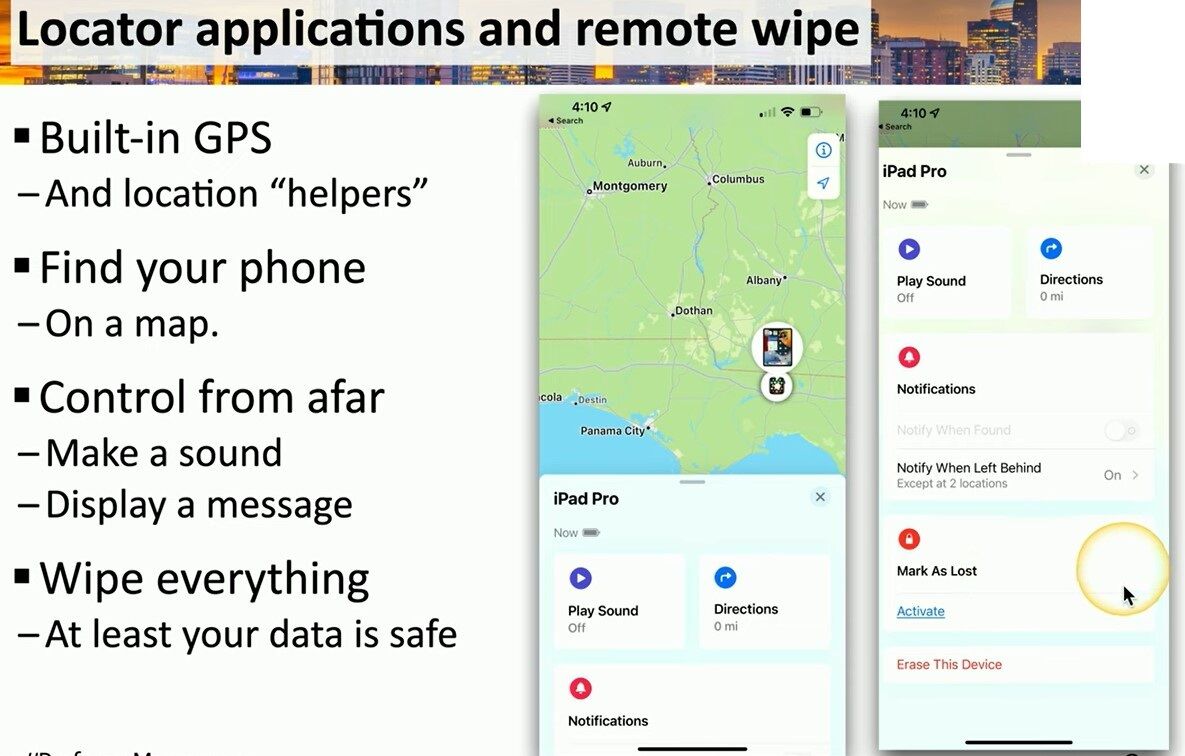
Whether you are tracking down a misplaced iPad Pro or managing a fleet of corporate phones, here is your standard IT troubleshooting escalation protocol:
1️⃣ Play a Sound: Is the device just buried under office paperwork or couch cushions? Force it to ring loudly—this feature completely bypasses silent mode! 🔊
2️⃣ Control From Afar: Activate “Mark As Lost”. This instantly locks the screen, disables Apple Pay, and displays a custom message with a contact number for whoever finds it. 💬
3️⃣ The Nuclear Option (Remote Wipe): If recovery is impossible, don’t gamble with your data. Triggering “Erase This Device” wipes every byte of data remotely. Your hardware might be gone, but your credentials, business emails, and personal records remain 100% safe from prying eyes. 🧼🔒
Prevention is always better than a cure. Make sure your tracking features are active before an emergency occurs! Let’s keep your digital workspace secure! 🚀 Learn more at matteocasiraghi.it
#ITSecurity
#TechTroubleshooting
#MobileDeviceManagement


Leave a Reply