 homepage | the beginning of

Understanding the chmod Command in Linux
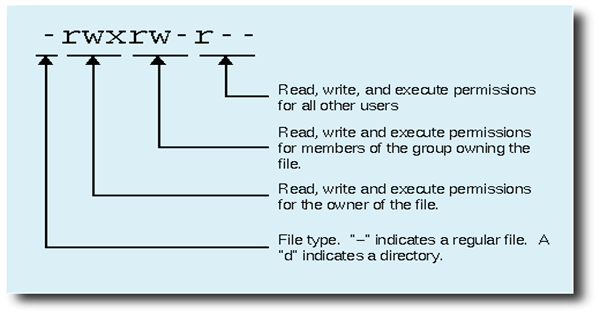
In Linux, every file has permissions that define who can read, write, or execute it. The chmod command allows you to change these permissions easily.
How Does chmod Work?
The syntax is simple: chmod XYZ filename
Xsets permissions for the owner of the fileYsets permissions for the groupZsets permissions for others
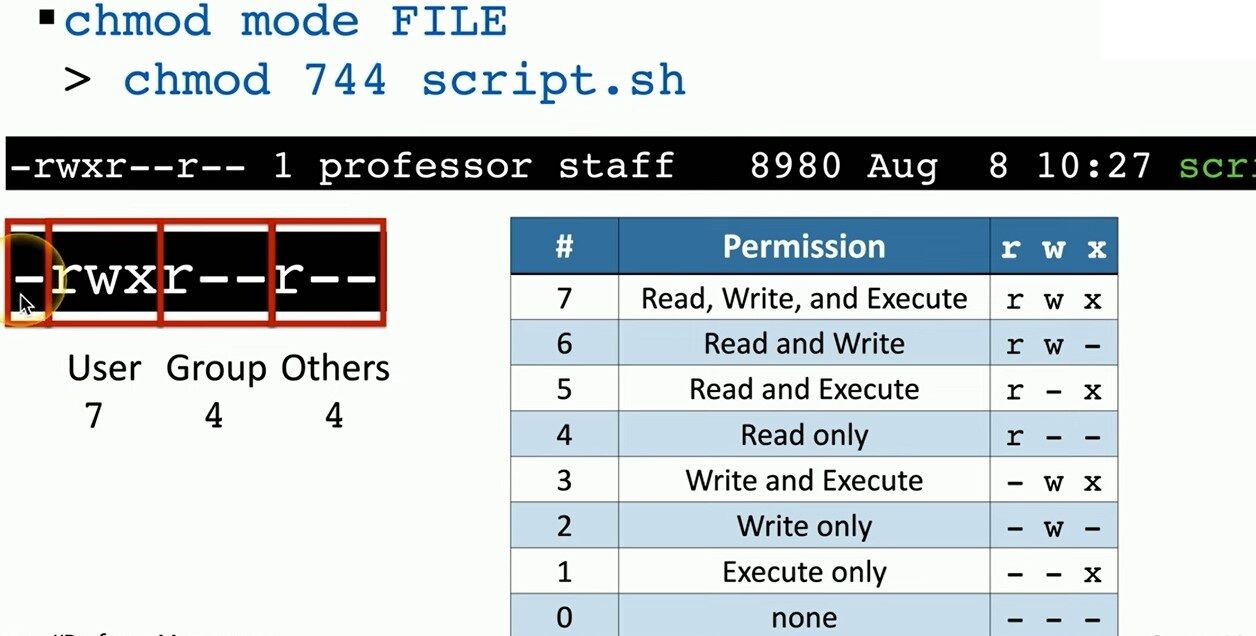
Each number represents a permission level:
7→ Read (r), Write (w), Execute (x) (full access)4→ Read-only (r--)5→ Read & Execute (r-x)6→ Read & Write (rw-)0→ No permissions (---)
Example: chmod 744 script.sh
If you run: chmod 744 script.sh
you are setting these permissions:
- The owner can read, write, and execute (7 →
rwx). - The group can only read (4 →
r--). - Everyone else can only read (4 →
r--).
This is a common setting for scripts, ensuring that only the owner can modify and run the file, while others can only view it.
For more Linux tips, visit Matching Tips:
🔗 Matching Tips – Learn More
#LinuxTips #chmod #FilePermissions
 the beginning of matching tips
Leave a comment