 homepage | the beginning of


Mastering System Security: Why Disabling Unnecessary Accounts is Non-Negotiable
🖥️ Every operating system, whether it’s Linux, Windows, or macOS, comes pre-loaded with a variety of default user accounts. We often see Guest, root, mail, daemon, and other service-specific users, as shown in the /etc/passwd file snippet.
🚫 But here’s the critical question: Are they all necessary?
The simple answer is no. Each active account represents a potential entry point for an attacker. Unused or unmonitored accounts are significant security liabilities.
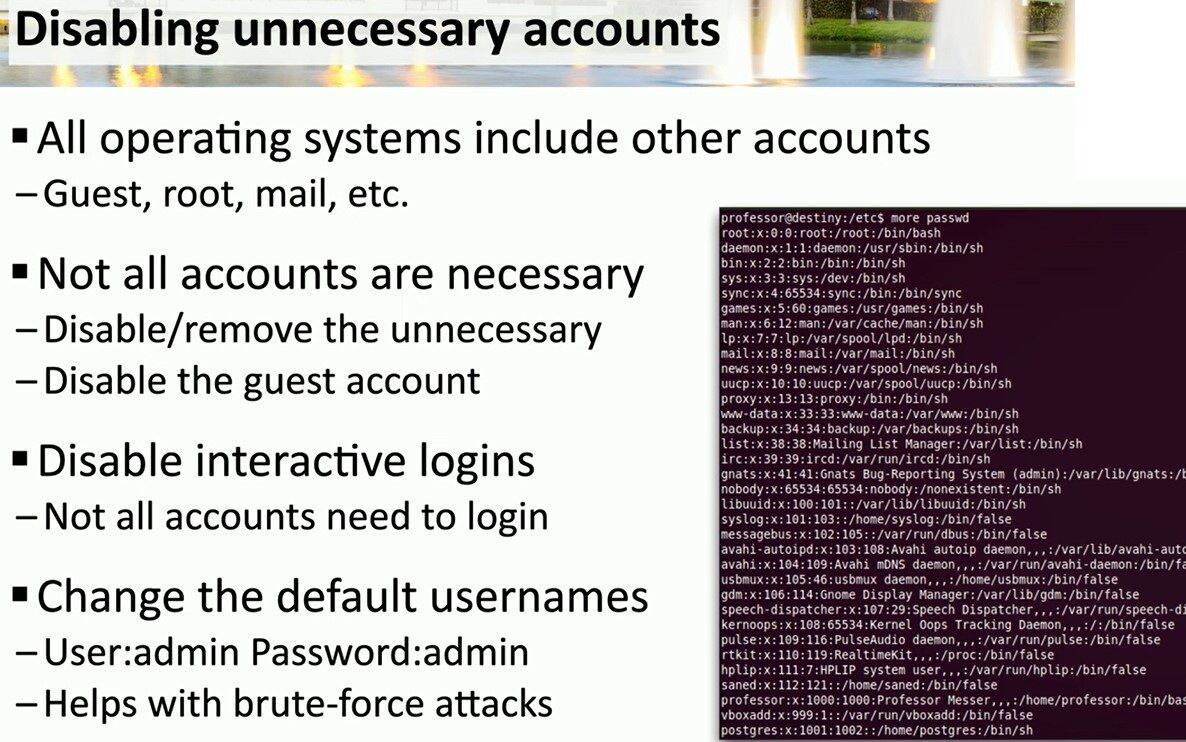
Here are the key hardening steps highlighted in this security briefing:
- 🧹 Disable or Remove the Unnecessary: The most straightforward rule of cybersecurity. If an account (like the
Guestaccount) isn’t serving a critical business function, it should be disabled or removed entirely. - 🔐 Disable Interactive Logins: This is a crucial concept, perfectly illustrated by the image. Look at accounts like
www-data,bin, ordaemon. Their shell is set to/usr/sbin/nologinor/bin/false. This is intentional! These accounts need to exist to run services, but no human should ever log into them. By disabling their interactive shell, you block a major vector for privilege escalation. - 🛡️ Change Default Usernames: Never, ever leave default credentials like
User:admin/Password:admin. This is the very first thing malicious scanners and brute-force attacks look for. Changing them is your first line of defense.
💡 In short: a smaller attack surface means stronger security. Auditing and disabling unnecessary accounts is a fundamental, high-impact task for any system administrator or technical consultant.
#CyberSecurity #SystemHardening #LinuxSecurity
Find more insights and technical guides on my website.
Visit ➡️ matteocasiraghi.it ⬅️ for more!
#SysAdmin #ITSecurity #TechConsultant
 the beginning of matching tips
Leave a comment