 homepage | the beginning of


NTFS vs. Share Permissions: What’s the Difference?
The attached image highlights a fundamental aspect of Windows file sharing: the difference between NTFS and Share permissions.
On the left, the NTFS permissions window allows fine-grained control over who can access and modify files and folders locally, using a list of specific users and groups, such as SYSTEM, Administrators, and Everyone. Each permission, like Full Control, Modify, Read & Execute, and Write, can be enabled or denied independently. These NTFS settings always apply, whether access occurs locally or across the network.
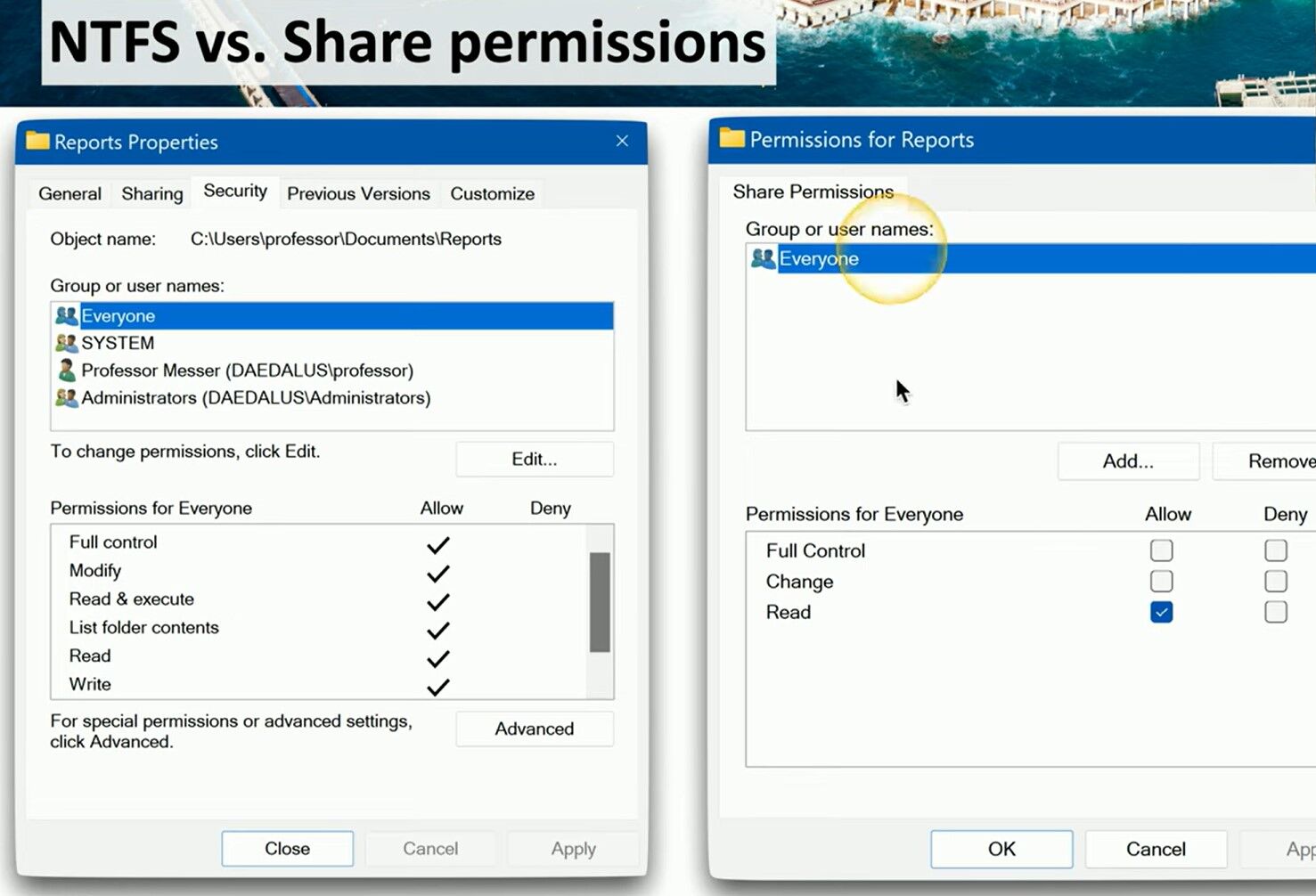
On the right, we see Share permissions, which only apply when files are accessed remotely over a network share. Share permissions are simpler, offering three options: Full Control, Change, and Read, assignable to groups like Everyone. Even if Share permissions allow access, NTFS permissions always remain in effect, so the most restrictive setting wins.
In summary, NTFS permissions provide advanced security and customization at the file system level, while Share permissions control network visibility and remote access. Effective security relies on understanding and configuring both, ensuring users have only the required level of access—never less, never more.
Learn more at matteocasiraghi.it
 the beginning of matching tips
Leave a comment