 homepage | the beginning of


Boot Password Management: Securing Your BIOS and System
**Introduction**
Boot password management is a crucial element of computer security, especially for those who want to safeguard their devices against unauthorized access. BIOS (Basic Input/Output System) settings provide two essential password layers: the BIOS Password (or User Password) and the Supervisor Password. This guide explains their functions and the implications of using them.
**1. BIOS Password / User Password**
The BIOS password, often referred to as the User Password, is required to start the operating system. If this password is set:
– **System Block**: The computer won’t boot into the operating system unless the password is provided.
– **Purpose**: It ensures that unauthorized users cannot access the system’s OS or stored files, even if they physically possess the device.
– **Use Case**: This is ideal for protecting personal laptops or workstations in shared environments.
—
**2. Supervisor Password**
The Supervisor Password offers a higher level of control by restricting access to BIOS configuration settings. When enabled:
– **Configuration Protection**: Only users with this password can make changes to critical BIOS settings.
– **System Integrity**: It prevents unauthorized modifications, such as altering boot sequences or disabling security features.
– **Requirement**: This is a must for IT administrators or power users who need to enforce strict security policies.
—
**3. The Importance of Remembering Passwords**
Forgetting your BIOS or Supervisor Password can lead to complications:
– **No Easy Recovery**: Unlike OS passwords, BIOS passwords often require resetting the BIOS, which involves opening the device and clearing CMOS settings.
– **Tips for Avoiding Issues**:
– Store passwords securely using a password manager.
– Use memorable yet strong password combinations.
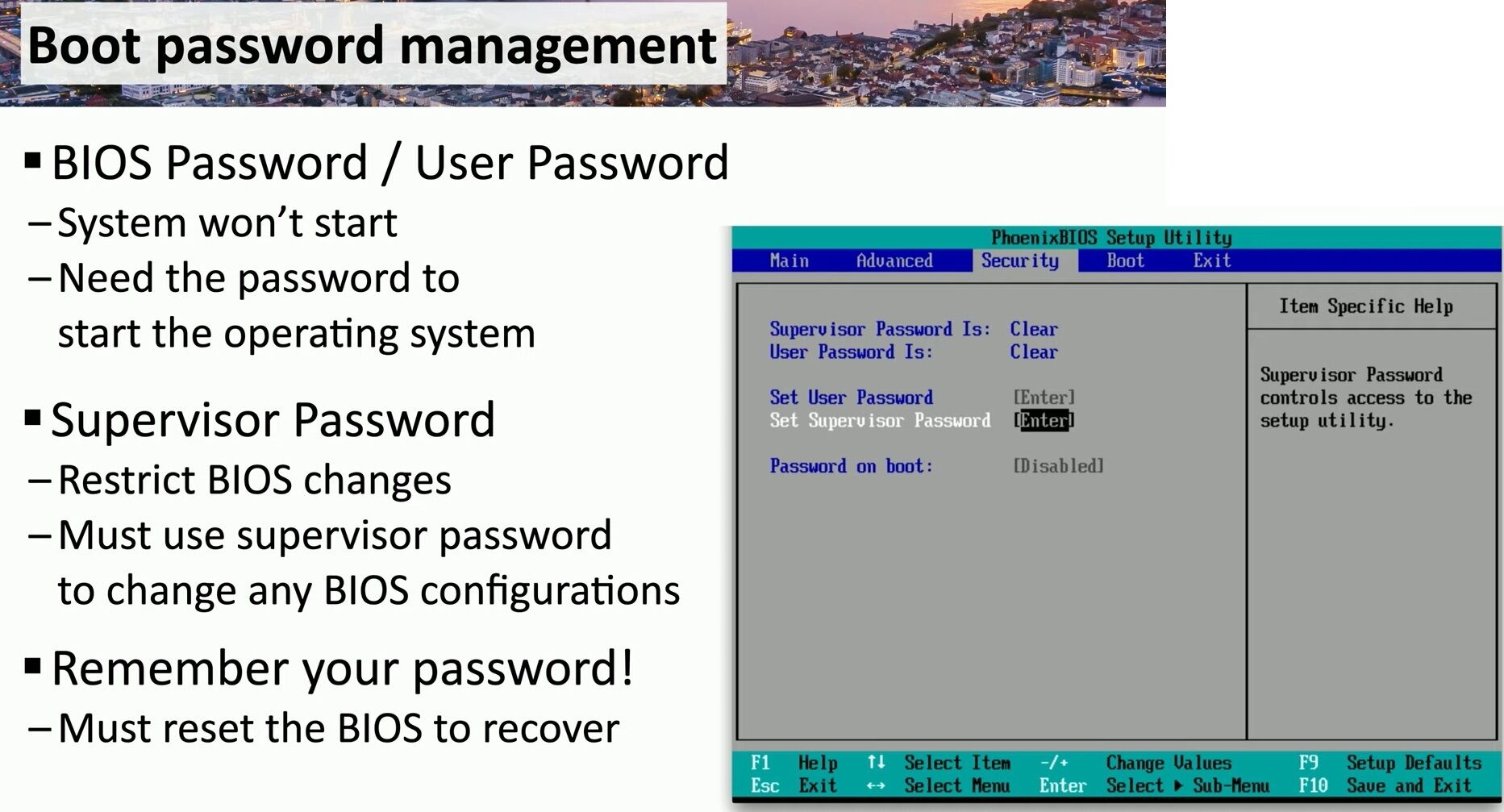
**How to Configure These Passwords**
– **Access BIOS**: Restart your system and press the designated key (commonly F2, Del, or Esc) to enter the BIOS menu.
– **Navigate to Security Settings**: Locate the “Set User Password” and “Set Supervisor Password” options, as shown in the interface above.
– **Set Passwords**: Follow on-screen prompts to configure passwords. Save changes and exit.
—
**Why Use Both Passwords?**
Implementing both BIOS and Supervisor Passwords creates a two-tiered security model:
1. **Prevents Unauthorized Access**: Without the User Password, the system won’t boot.
2. **Protects Configuration**: The Supervisor Password safeguards critical BIOS settings, ensuring the system remains tamper-proof.
—
**Conclusion**
Boot password management is a straightforward yet powerful way to secure your computer. By leveraging BIOS and Supervisor Passwords effectively, you can protect your system from unauthorized access while maintaining control over sensitive configurations. However, always ensure you store passwords securely to avoid accidental lockouts.
—
**#BIOSPassword #ComputerSecurity #BootProtection**
 the beginning of matching tips
Leave a comment