 homepage | the beginning of

Understanding Ports on the Network: A Fun Guide!
Hello, tech enthusiasts! Today, we’re diving into the world of network ports. Now, before you yawn and close this tab, let me assure you, it’s more fascinating than you think. Trust me!
First, let’s talk about why ports are essential. Think of a port as a gatekeeper on your computer’s IP address, ensuring data packets find their rightful destination. Without ports, your computer would be like a post office with no mailbox numbers—utter chaos!
Let’s break down the ports mentioned in the image:
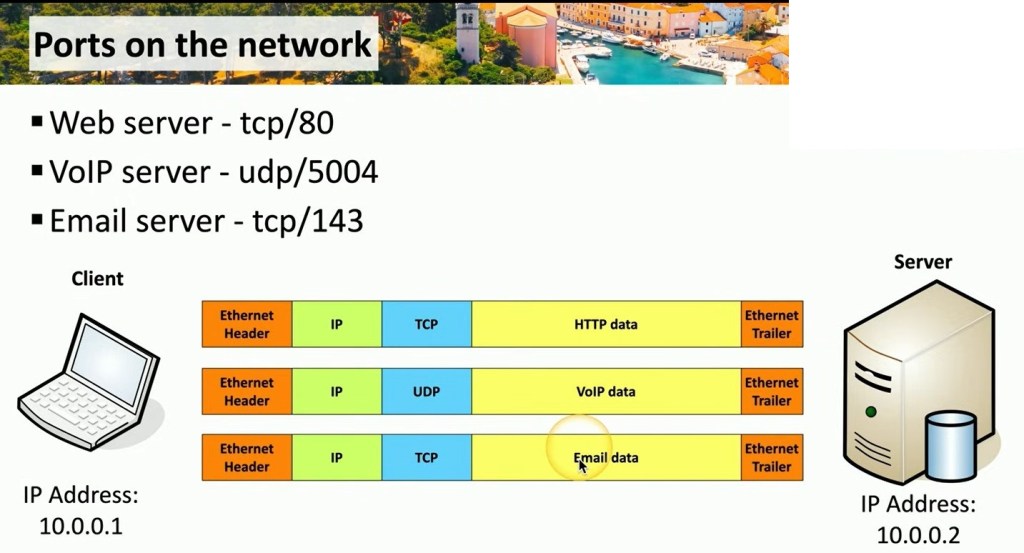
Web Server (tcp/80): This is the default port for HTTP, the protocol of the web. When you type a URL into your browser, your computer uses port 80 to fetch that website. Imagine it as the front door to the internet.
VoIP Server (udp/5004): Voice over Internet Protocol (VoIP) uses port 5004. This port ensures your voice data packets get to the correct place quickly, like directing urgent messages in a bustling city.
Email Server (tcp/143): For email, port 143 is used by the IMAP protocol. It helps retrieve emails from a server, like your virtual postman delivering your daily mail.
In the diagram, the client (your device) with IP 10.0.0.1 connects to the server at 10.0.0.2. Each type of data—HTTP, VoIP, and email—gets neatly packed and directed through its specific port. This organization is crucial for seamless communication and data transfer on the network.
So, next time you stream a video, make a call, or check your email, you’ll know the hidden network magic that makes it all possible!
For more tech insights, visit matteocasiraghimc.wordpress.com
Stay curious, stay connected!
#Networking #TechTips #LearnTech
 the beginning of matching tips
Leave a comment