 homepage | the beginning of

Importance of Multiple DHCP Servers
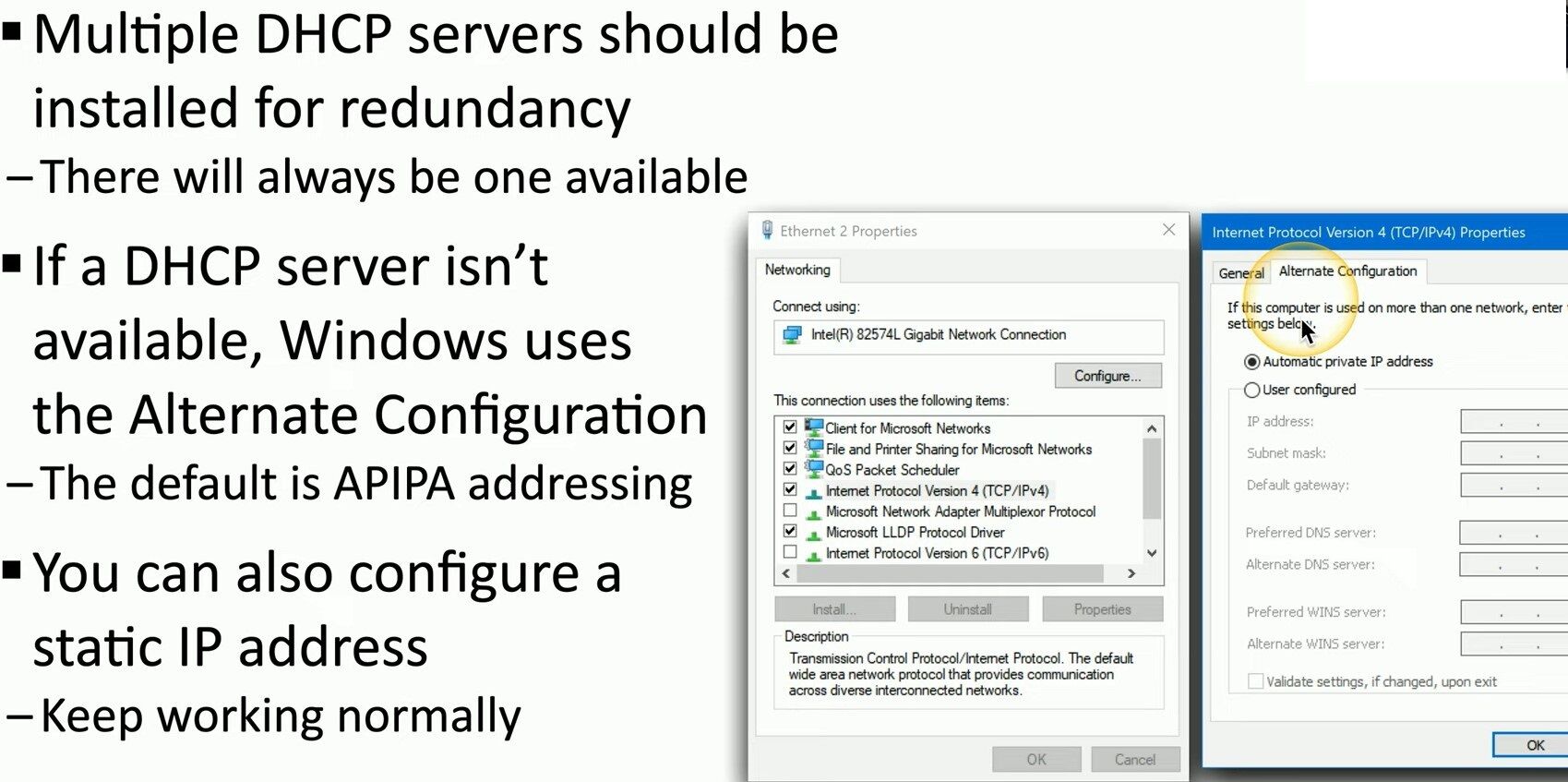
Having multiple DHCP (Dynamic Host Configuration Protocol) servers in a network is critical for redundancy. This ensures that if one DHCP server fails, another can take over the responsibility of assigning IP addresses to devices on the network. This redundancy helps maintain network reliability and availability.
DHCP Server Redundancy
- Load Balancing: Multiple DHCP servers can be configured to share the load of IP address assignments. This can improve network performance and prevent any single server from becoming a bottleneck.
- Failover: If one DHCP server goes down, the other can continue to operate, ensuring that devices on the network can still obtain IP addresses and maintain connectivity.
Handling DHCP Server Unavailability
When a DHCP server is not available, Windows clients use an alternative method to ensure network functionality:
- Alternate Configuration:Windows clients are configured to use an Alternate Configuration if a DHCP server is not reachable.The default Alternate Configuration is APIPA (Automatic Private IP Addressing).
- APIPA Addressing:APIPA automatically assigns an IP address from the range 169.254.0.1 to 169.254.255.254.This allows devices on the same network to communicate with each other even without a DHCP server, but it does not support communication outside the local network (i.e., no internet access).
- This allows devices on the same network to communicate with each other even without a DHCP server, but it does not support communication outside the local network (i.e., no internet access).
Configuring a Static IP Address
Alternatively, devices can be manually configured with a static IP address to ensure continuous operation, regardless of the DHCP server status. This can be especially useful for critical devices that need guaranteed network connectivity.
Steps to Configure a Static IP Address:
Access the network settings on the device, select the option to manually configure the IP address and then enter the desired IP address, subnet mask, gateway, and DNS server information.
By configuring a static IP address, devices can bypass the need for a DHCP server and maintain normal network operations. However, this approach requires careful management to avoid IP address conflicts and ensure proper network configuration.
Conclusion
Implementing multiple DHCP servers enhances network reliability through redundancy and load balancing. In the absence of a DHCP server, Windows clients can use APIPA or be configured with static IP addresses to maintain network functionality.
#NetworkReliability #DHCPRedundancy #StaticIPConfiguration
 the beginning of matching tips
Leave a comment